Chapter 2 of Solana Accounts: Programs, Wallets, Mints & Token Accounts Explained
TL;DR
- Solana Accounts 101: Programs, Wallets, Mints, and Token Accounts.
- Program Accounts run executable code; Wallet Accounts represent users.
- Mint Accounts define tokens, while Token Accounts store user balances.
- Understanding these relationships is the foundation for building on Solana.
This article was prepared by Core Dev Team and edited by Marketing team of Nodit
In the previous chapter, we walked through the core pieces of Solana’s architecture - from how it achieves parallel execution, to the way its account model works, to the high-speed infrastructure that keeps everything running. (If you missed it, go check it out! Here)
For this chapter, we will go a layer deeper which is one of the most important ideas to understand in Solana “Every piece of data on Solana is stored inside an Account.”
It doesn’t matter whether it’s token data, program state, metadata, or anything in between — if it lives on Solana, it lives in an Account.
All Data on Solana Lives Inside an Account
Solana does not use “contracts” with internal storage like Ethereum.
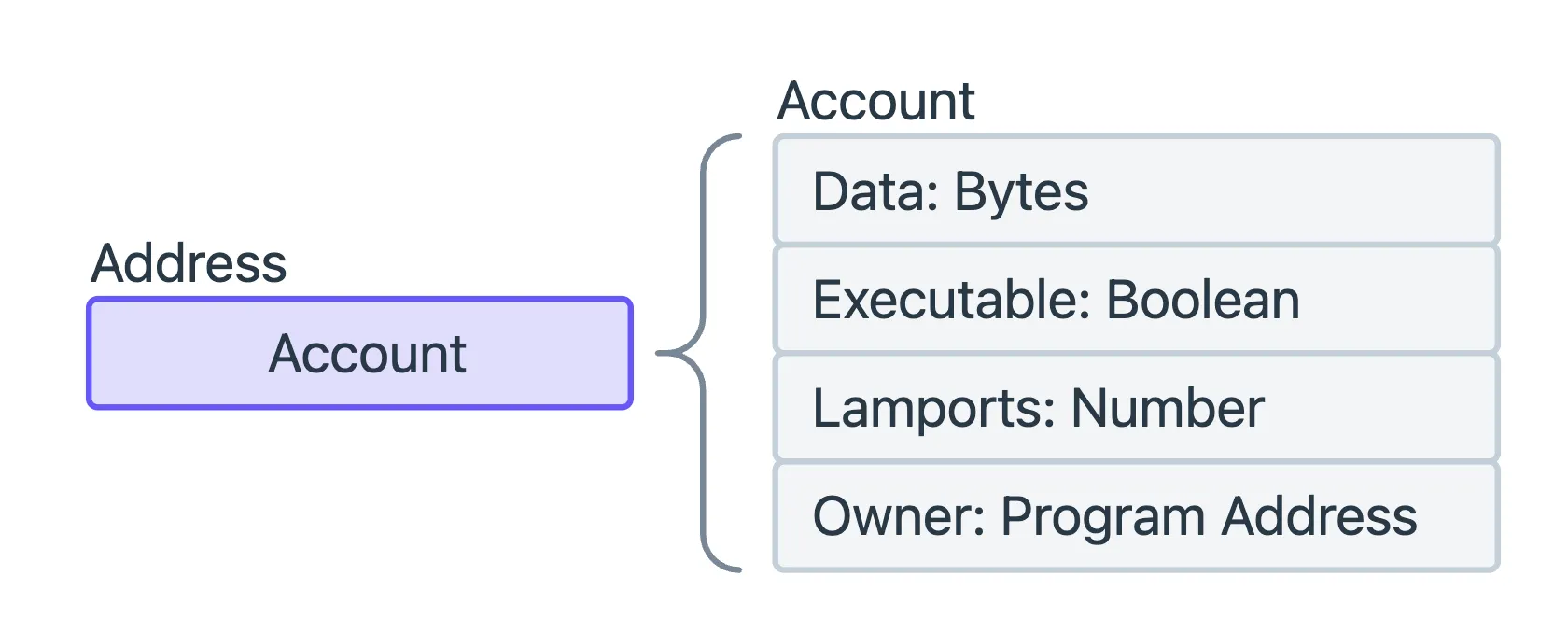
Instead, Solana breaks everything into Accounts, and each Account contains:
- lamports (SOL balance)
- owner program (which program is allowed to modify it)
- optional data field (up to 10MB)
- executable flag (true/false)
Different account types simply represent different combinations of these fields.
There are four foundational account types every developer must understand:
- Program Accounts
- Wallet Accounts
- Mint Accounts
- Token Accounts (including ATAs)
Let's break them down.
1️⃣ Program Account, the core component that powers execution on Solana.
If you're coming from Ethereum, you might instinctively think of this as a “smart contract.”
That comparison isn’t wrong, but it’s not the full picture.
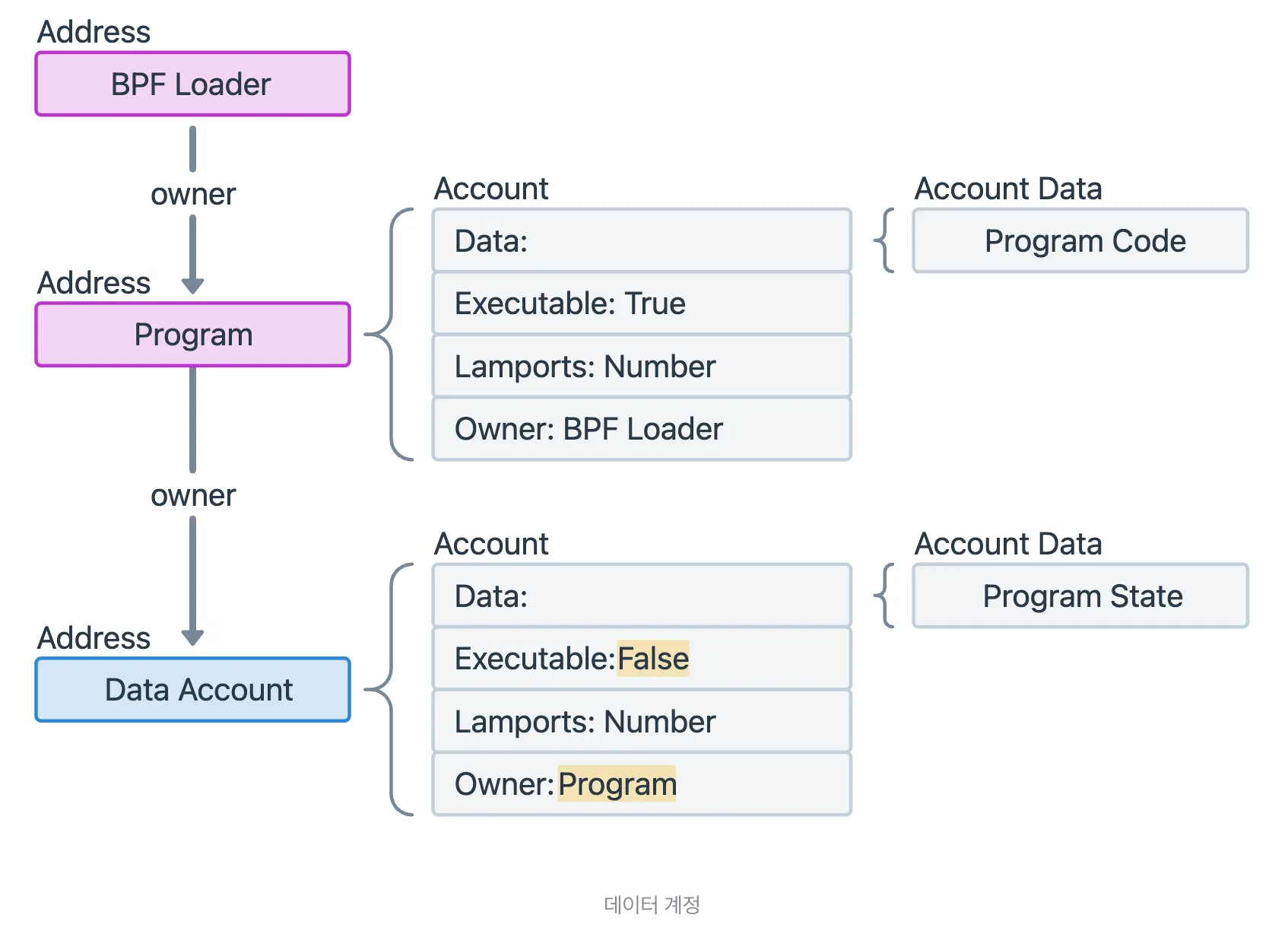
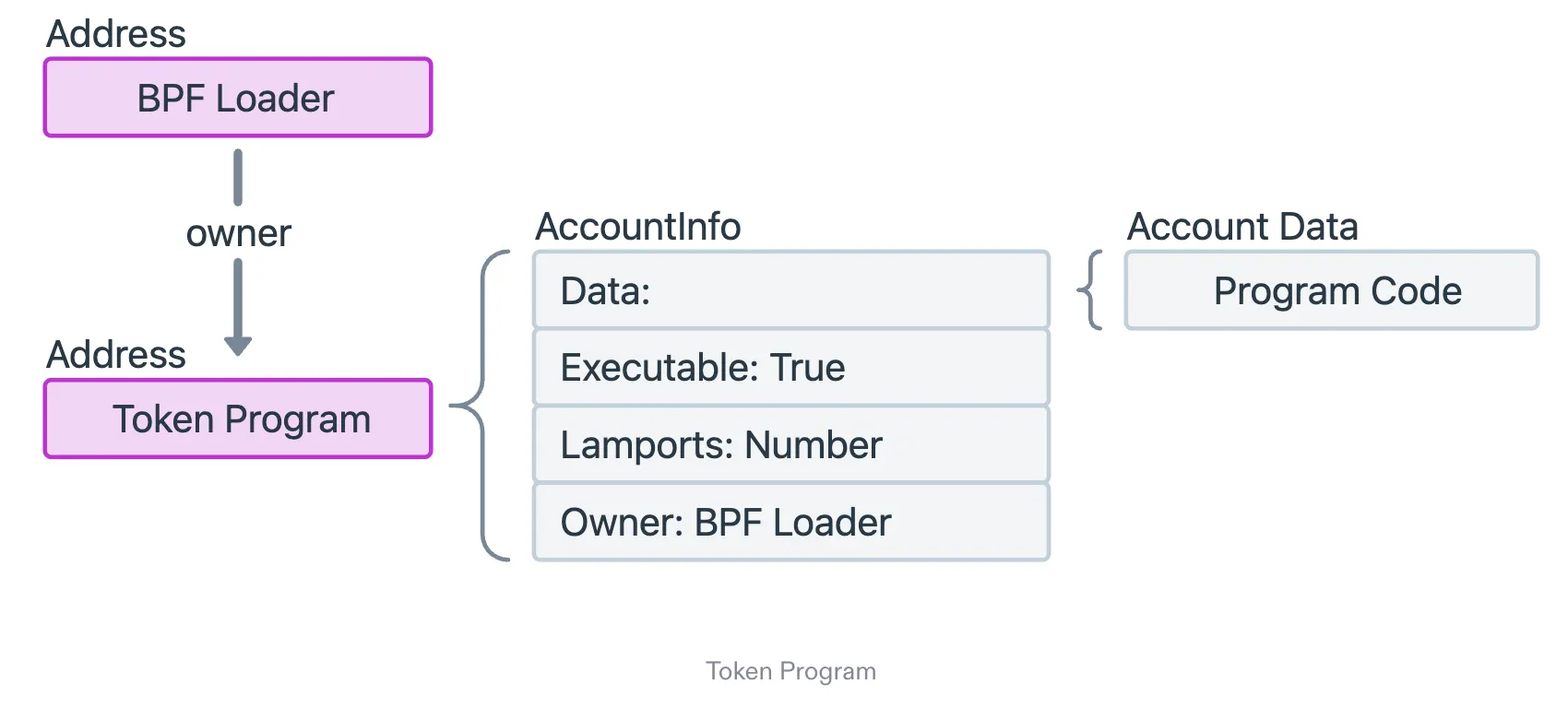
On Solana, a Program is simply an Account marked as executable.
That’s it. Nothing mystical. No hidden VM tricks.
Just an Account whose executable = true.
In a typical setup, you’ll see three main parts:
- BPF LoaderThe system component responsible for loading and verifying program binaries.(We can safely ignore this for now.)
- Program AccountThis is the account that actually contains your compiled BPF code.
- Data AccountThis is where your program’s state is stored.
💡And here’s the key rule you need to remember:
👉 Only the Program that owns a Data Account is allowed to modify the data inside it.
This ownership model is central to how Solana enforces account-level permissions.
2️⃣ Wallet Accounts: one of the simplest account types on Solana
Now that we’ve looked at Program Accounts, let’s shift to something most of us interact with every day: Wallet Accounts.
And honestly? They’re one of the simplest account types on Solana.
At the end of the day, a wallet is just… an Account.
But it has two traits that make it stand out:
- It’s not executable
- It’s owned by the System Program
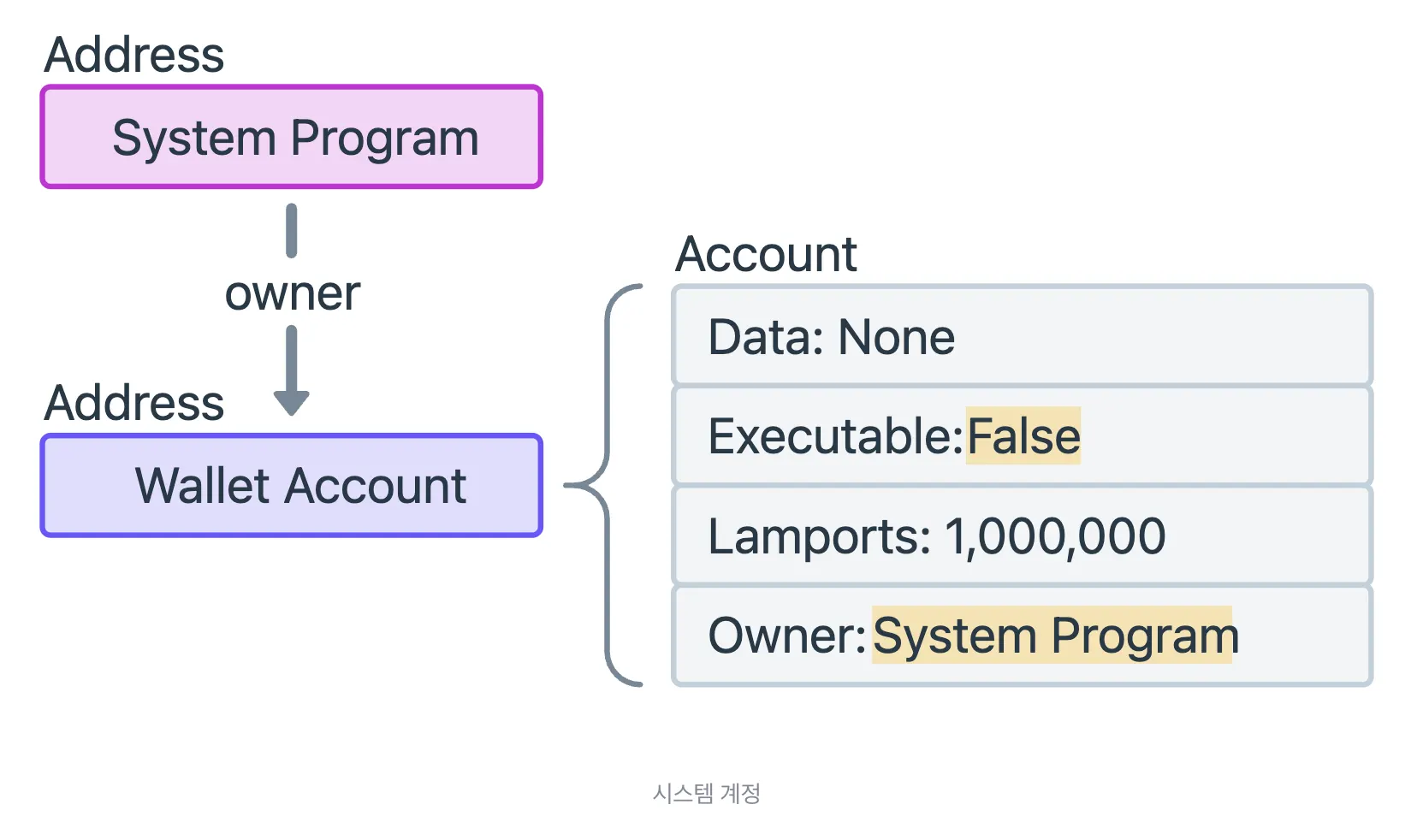
No hidden logic, no fancy flags — just a basic account managed by one of Solana’s built-in system programs.
If you’re wondering what the System Program actually is, think of it as:
Solana’s “account manager” — the built-in program responsible for creating and configuring accounts.
It’s deployed by the Solana Foundation and comes baked into the network.
Whenever you make a new account, guess who’s behind it? Exactly! It’s the System Program.
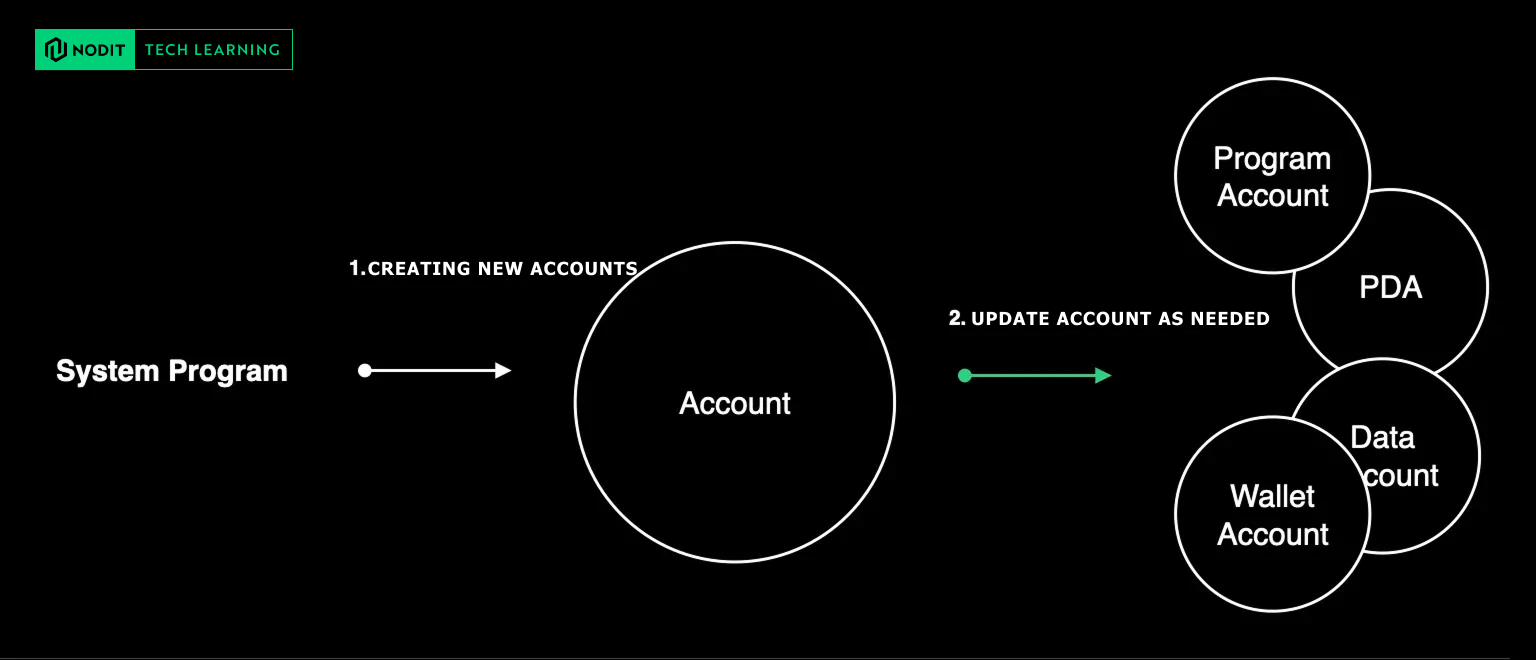
It handles things like:
- Creating new accounts
- Funding them with rent-exempt SOL
- Assigning their owner (which Program can modify them)
So if a wallet exists, it’s because the System Program helped set it up.
Hints:How Accounts Get Created (The Part Every Dev Should Know)
Creating an account in Solana always follows a similar pattern, whether it’s a wallet, a data account, or something more custom.
When you call create_account, here’s what’s happening behind the scenes:
- You generate a new public key
- You deposit enough SOL to make it rent-exempt
- You decide how much data space it needs
- You assign a Program that “owns” it
In Rust language, that looks something like:
solana_program::system_instruction::create_account(
    &from_pubkey,         // Who pays for the account
    &new_account_pubkey,  // The account being created
    lamports,             // Rent-exempt amount
    space,                // Data size
    &owner_program_id     // Program that owns this account
)
Once this clicks, Solana’s account model suddenly becomes way less intimidating.
💡Plus: What About the BPF Loader?
We saw something called the BPF Loader, so let’s give it 30 seconds of attention in earlier.
Every executable Program on Solana is owned by a Loader.
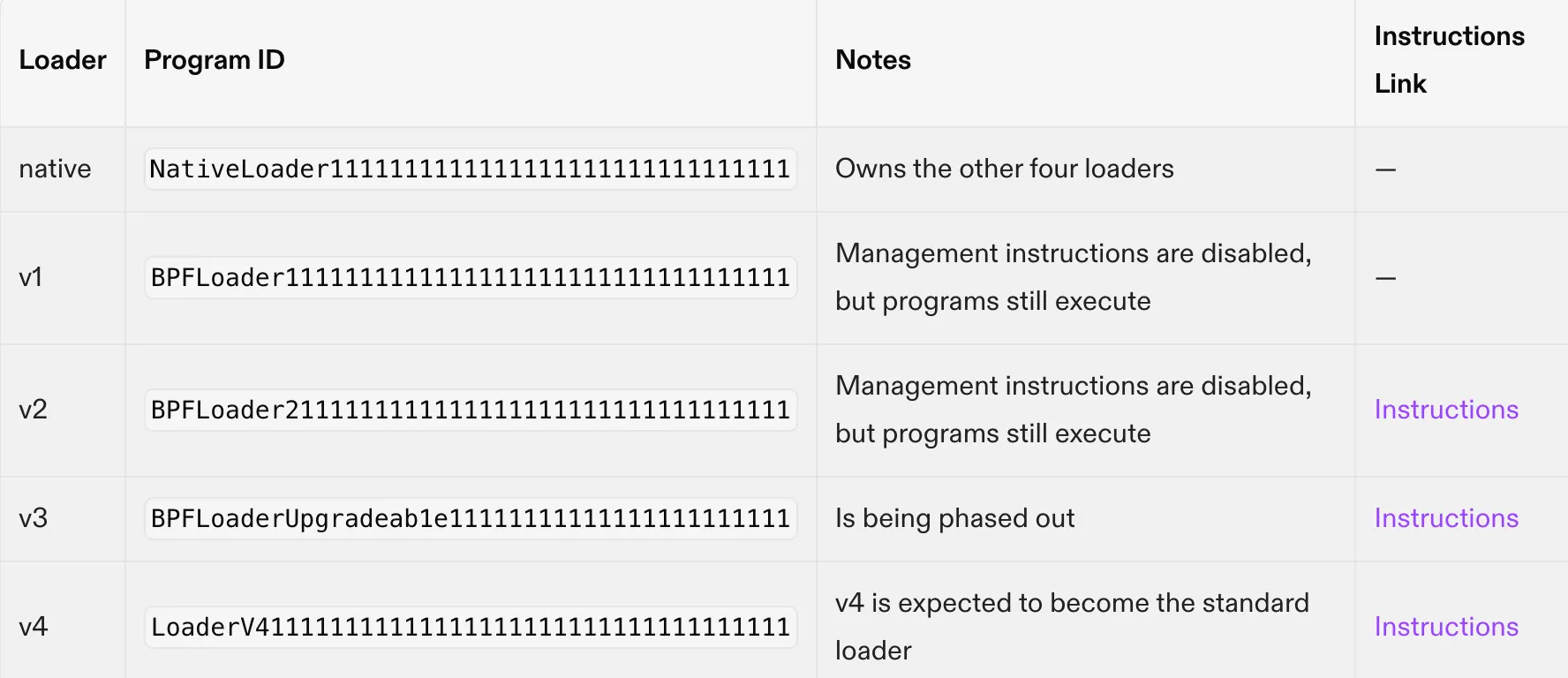
There are a few versions, but developers mostly encounter:
- BPF Loader v3 (supports upgradable programs)
- BPF Loader v4 (the newer standard)
Think of the Loader as the runtime environment that knows how to load, verify, and run your program code.
It’s not something you touch often, but it’s important to know it exists.
SPL (Solana Program Library): The Token Standard Every Solana Dev Touches
Before we go deeper into how Solana handles data and accounts, we need to talk about something you’ll almost certainly encounter when building on Solana: SPL, the Solana Program Library. SPL provides the standard on-chain programs that allow developers to create and manage tokens. In that case, any token issued through this library is simply called an SPL Token.
If you’re coming from Ethereum, the idea should feel familiar:
SPL Tokens are to Solana what ERC-20 tokens are to Ethereum —a shared standard that ensures consistent behavior across apps and wallets.
Types of Token Programs
1. SPL Token Program (Classic standard)
Program ID: TokenkegQfeZyiNwAJbNbGKPFXCWuBvf9Ss623VQ5DA
This is the original token standard on Solana, responsible for minting and managing both:
- Fungible tokens (the typical “SPL Token”)
- NFTs (technically SPL Tokens with 0 decimals)
It supports all the basic operations you’d expect:
- Mint / burn
- Transfer
- Approvals
- Creating associated token accounts
But it does have limitations.
The classic SPL Token Program doesn’t support more flexible features such as:
- Custom fee rules
- Pre-transfer validation or hooks
- Built-in lock/vesting mechanisms
- Conditional transfers
These limitations eventually led to the next evolution of the token program.
2. Token Extensions (introduced after 2022)
Program ID: TokenzQdYJ7eFZdDZzgdqHrAe7jCLsZ2Nwuzs3d7T1gX
Token Extensions are essentially an upgraded, more modular version of the original SPL token program.
They add optional features that can be enabled depending on the token’s requirements.
Some examples include:
- Transfer hooks — run logic before/after transfers
- Memo requirements — enforce transaction memos
- Transfer fees — automatically deduct custom fees
- …and more
This opens the door for more sophisticated token use cases that weren’t possible under the original SPL Token standard.
Way to create a token with the Token Program
Now that we know what the Token Program is, the next question is obvious:
How does a token actually get created on Solana?
This diagram is a great way to visualize how token ownership works on Solana. Even though everything—wallets, token accounts, mints—are technically just “Accounts,” they each have a very different purpose.
Let’s break it down.
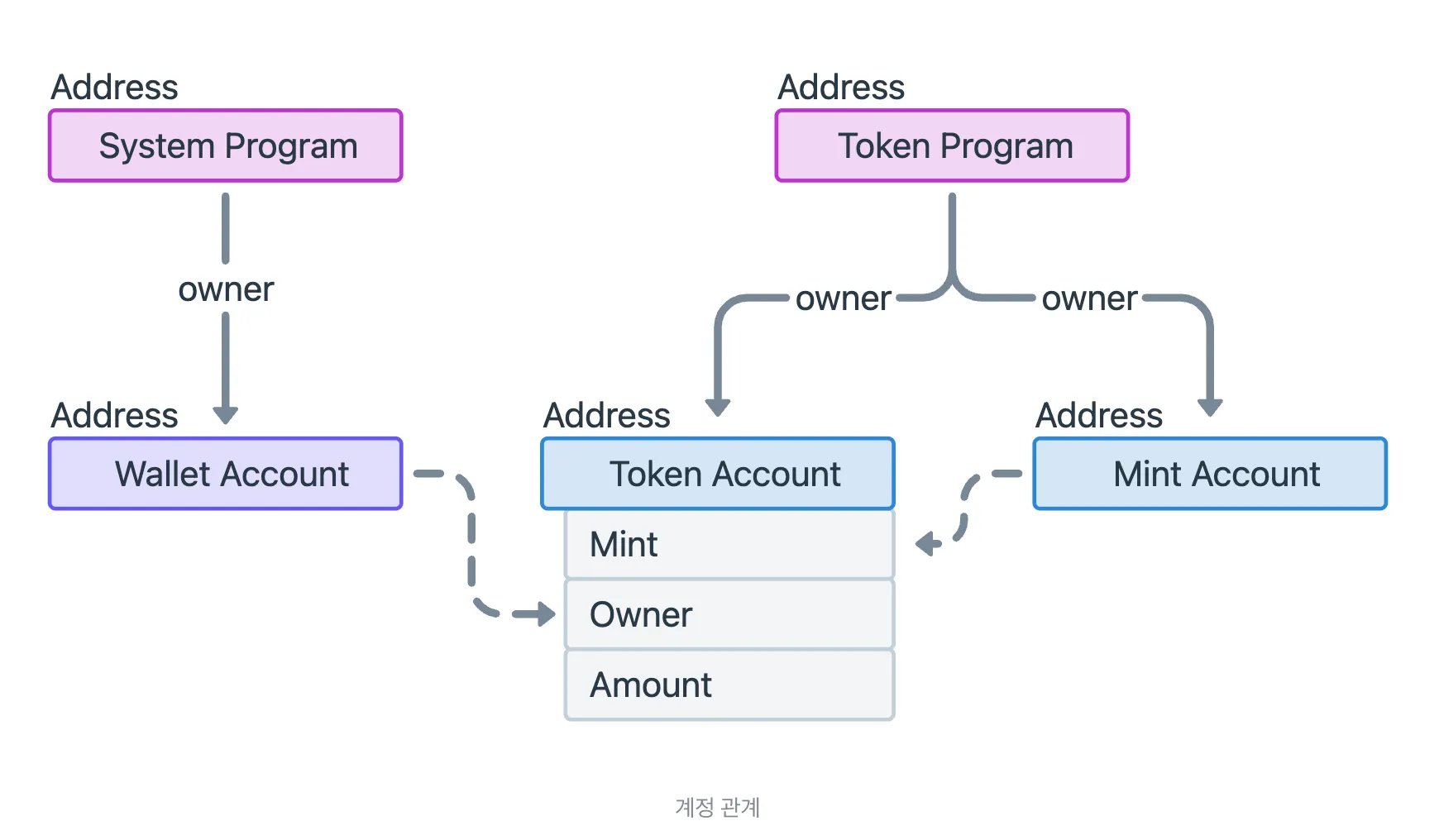
When you look at the Token Program in action, you’ll see three different types of Accounts involved that’s really important to understand what each one represents.
Here are the three players:
1️⃣ Wallet Account — the user’s wallet (your regular keypair)
Wallet Account (owned by the System Program)
On the left, you’ll see the Wallet Account, and it’s owned by the System Program.
This makes sense because wallets are just basic accounts created by Solana’s built-in account manager.
A wallet:
- has a private key you control
- can sign transactions
- cannot hold any token balance directly
This last part is important:
your wallet owns your tokens, but your wallet address does not store their balance.
2️⃣ Token Account — an account that can hold a specific token
Token Account (owned by your Wallet, but managed by the Token Program)
In the center is the Token Account, and this is where the actual token balance lives.
A Token Account stores:
- mint → which token it belongs to
- owner → who controls this account (usually your wallet)
- amount → how many tokens it holds
A wallet needs a separate Token Account for each token type:
- 1 ATA for USDC
- 1 ATA for wSOL
- 1 ATA for your custom token
- etc.
The Token Program owns the Token Account (so only the Token Program can modify balances),
but your wallet owns the authority over that Token Account.
The Mint defines what the token is, and the wallet needs a Token Account to actually receive any of those tokens. We can illustrate this more clearly in the diagram below.
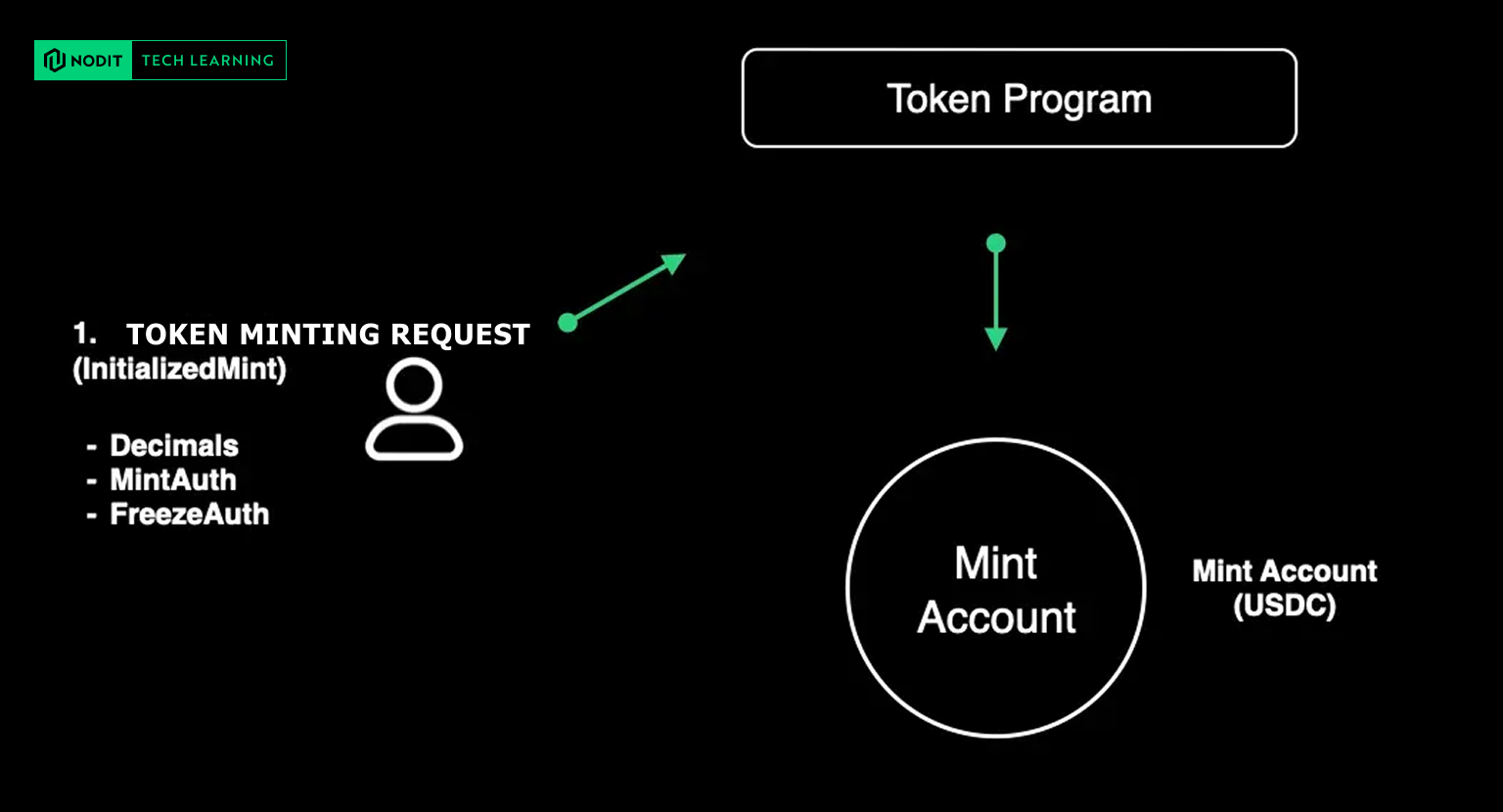
3️⃣ Mint Account — the account that stores the metadata and configuration of the token itself
On the right, you see the Mint Account.
This account is also owned by the Token Program because it's entirely managed through token instructions.
The Mint Account defines:
- the token’s decimal places
- the total supply
- the authority that can mint or freeze
- the identity of the token itself
Think of the Mint Account as the “specification sheet” or “DNA” of the token. Each one plays a completely different role, even though they’re all just “Accounts” under the hood.
To visualize the relationship between a Wallet Account and a Mint Account, it will be looked like this:

Example of “Token Program”:
USDC Token Architecture Overview
1. USDC Mint Account
- Address:
EPjFWdd5AufqSSqeM2qN1xzybapC8G4wEGGkZwyTDt1v - Owner: Token Program
- Key Fields: decimals, mint authority, total supply, etc.
The Mint Account represents the token definition itself—similar to a token contract address on an EVM chain. It contains the metadata and authorities responsible for managing the token.
Mint struct example:
pub struct Mint {
    pub mint_authority: COption<Pubkey>,    // Entity allowed to mint new tokens
    pub supply: u64,                        // Total token supply
    pub decimals: u8,                       // Number of decimal places
    pub is_initialized: bool,               // Initialization status
    pub freeze_authority: COption<Pubkey>,  // Authority able to freeze accounts
}
2. My USDC Token Account
- Address:
9zsHDPqNomhse5tz5wHz1usun9gi8UmiQ5KeBF6dmS5u - Owner: Token Program
- Key Fields: owner, mint reference, balance, etc.
A Token Account tracks the balance of a specific user for a specific Mint. In other words, it represents how much of that token a user owns.
Token Account struct example:
pub struct Account {
    pub mint: Pubkey,            // Mint this account is tied to
    pub owner: Pubkey,           // Actual owner of the account
    pub amount: u64,             // Token balance
    pub delegate: COption<Pubkey>,
    pub state: AccountState,
    pub is_native: COption<u64>,
    pub delegated_amount: u64,
    pub close_authority: COption<Pubkey>,
}
✔️ Summary Flow Diagram
[MINT ACCOUNT]
       ↓ defines token
       ↓
[USER WALLET]
       ↓ derives PDA
       ↓
[ASSOCIATED TOKEN ACCOUNT]
       ↑ holds user balance
       |
MintTo → increases balance
Transfer → moves balance
Burn → decreases balance
3. Associated Token Account (ATA)
An Associated Token Account (ATA) is the default token account each user has for a specific token.
Instead of manually creating token accounts, Solana derives this address automatically from:
- the user’s wallet address, and
- the token’s Mint address
(using a PDA derivation).
This guarantees there is one canonical token account per user per token, making token handling predictable for wallets and applications.
Your wallet holds the authority to use the ATA, while the Token Program manages its internal token balance.
Summary of This Chapter
To wrap up, remember this foundational idea:
Solana’s entire ecosystem is built on Accounts. Whether it’s a wallet, a token balance, or the program code itself, it all lives inside different types of Accounts with different owners and permissions.
For the next chapter, we’ll break down the internal structure of these Accounts and explore how data is organized on-chain. Stay tuned for more! In the meantime, if you’re attending Solana Breakpoint 2025 for infrastructure strategy, technical exchange, or guidance on building. Let’s connect!

🔎About Nodit
Nodit is a platform that provides reliable node and consistent data infrastructure to support the scaling of decentralized applications in a multi chain environment. The core technology of Nodit is a robust data pipeline that performs the crawling, indexing, storing, and processing of blockchain data, along with a dependable node operation service. Through its new Validator as a Service (VaaS) offering, Nodit delivers secure, transparent, and compliant validator operations that ensure stability, performance visibility, and regulatory assurance.
By utilizing processed blockchain data, developers and enterprises can achieve seamless on chain and off chain integration, advanced analytics, comprehensive visualization, and artificial intelligence modeling to build outstanding Web3 products.
Homepage l X (Twitter) l Linkedin
Join us and build more👊🏻
👉Start for Free (Click)